If you run procurement, finance, or IT for a large organization, you already know this problem, even if you’ve never had to explain it to a vendor: your company is not one tidy legal entity with one credit card. It’s a holding company with country-level subsidiaries, each carrying its own P&L and tax ID. It’s a client account that has to be billed separately from operating budget, and approved by both a project owner and central finance, in that order. It’s a jurisdiction where an invoice is legally worthless unless a specific line of text appears on it.
Most software platforms don’t have a good answer for that reality. They’re built around one account, one payment method, one invoice, and everything more complicated than that gets handled offline: someone at the vendor manually splitting a bill by tag, chasing down which subsidiary owes what, retyping a tax ID into an accounting system because the platform never had a field for it.
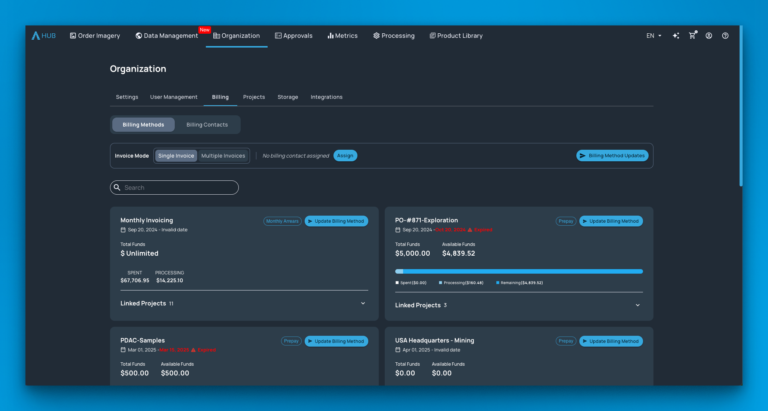
So we’ve substantially overhauled and extended the core business rules and financial compliance engine behind the SkyWatch Platform, the system of record underpinning your account, so that reality lives in the Platform itself, not in a spreadsheet. This isn’t a single bolt-on feature. It’s a set of controls that runs across how your organization is set up, how your users buy and use data, how you pay us, how your own customers pay you if you resell or pass through costs, and how we present billing and usage back to you in reporting. You configure and manage it through an application such as HUB, which sits on top of the Platform.
What you can now configure and manage
Your organization’s Super Admin can now align invoicing, approvals, and payment methods directly with your company’s actual structure.
Here’s what that looks like in practice.
1. Billing methods, matched to how you actually pay
The SkyWatch Platform offers two flexible billing methods to suit your needs: A monthly bill, where you’re invoiced monthly for the prior month’s activity, which suits an opex-style budget cycle. Prepay / Credits, where you pre-purchase a balance and draw it down against orders, with a monthly statement showing balance and debits, which suits organizations that prefer to commit and forecast against a fixed pool of funds.
You’re not locked into a one-size-fits-all subscription. Different teams or projects within the same organization can even sit on different billing methods, depending on how each one is funded.
2. Accurate, legally compliant billing contacts
A billing contact isn’t just an email address. It’s the complete shape of a billing entity: Registered entity name (for example, a specific country-level subsidiary rather than the parent company) Full billing address The actual accounts-payable contact at that entity Up to six delivery emails, so an invoice can reach an AP inbox, a project manager, and a controller at the same time A tax or VAT ID A free-text field for invoice-specific wording, since some jurisdictions won’t accept an invoice as payable without a particular line of text on it
By attaching a billing contact to a billing method, you gain full control over your invoice details, which take precedence over any information previously provided on order forms. Your Super Admin can update these details in one central location, ensuring accuracy without needing to track down and edit individual orders.
3. Invoice structure, set at the level that makes sense for you
You choose how invoices roll up across your organization: Single invoice (the default): everything consolidates into one invoice against the org-level billing contact. Simplest option if your organization operates as one billing unit. Invoice per billing method: each billing method gets its own invoice, routed to its own billing contact, covering every project on that method. Invoice per project: each project gets its own invoice and its own billing contact.
The last two options are built for organizations where a single SkyWatch account actually spans more than one financially independent unit. Sometimes that means multiple legal entities, such as country-level subsidiaries that each have their own registered name, address, and tax ID. Sometimes it means multiple units within a single legal entity, such as client accounts or cost centers that each need their own approval chain. Either way, each unit needs to see, approve, and pay its own invoice on its own terms.
To keep this from becoming a support burden, the Platform won’t let you save a multi-invoice configuration until every project connected to a billing method has an associated billing contact. If you’ve ever tried to save your billing setup and hit a wall, this is usually why, and the fix is to make sure every project in that structure has a contact assigned.
4. Projects, now with real financial weight
You could already associate a payment method with a project, but we’ve gone further. Projects are now true financial units that map directly to their own invoices. With their own AP contact, tax treatment, and budget, projects act as independent entities. If you’re organizing work by client engagement, cost center, or site, your projects now carry that financial structure all the way through to the billing statement.
5. Self-serve requests, with a real approval trail
Adding a new billing method, or changing an existing one, still goes through SkyWatch (there are real financial controls behind it), but the request itself lives inside the product rather than in an email thread.
You submit it through an application such as HUB, and it moves through visible statuses: Created, In Review, Invoiced, Paid, Declined, or Cancelled.
Each has a status reason you can see. That gives your own finance or audit team something concrete to point to when they need to know how and when a billing change was approved, instead of reconstructing the details from old emails.
6. Guardrails that catch problems before they happen
To prevent configuration errors, the system automatically validates your invoice structure before saving. It confirms that every project is correctly mapped to a billing contact, eliminating the risk of invoices being sent to inactive inboxes or projects missing their billing information. This ensures your setup is always complete and audit-ready from the moment it’s saved.
Why we built it this way
The organizations we work with in mining, engineering, energy, and government don’t fit neatly into a single-invoice model, and asking them to pretend otherwise just pushes the complexity into manual processes that don’t scale.
These controls exist so that the SkyWatch Platform reflects how your organization is actually structured, rather than forcing your organization to reshape itself around the limitations of whichever app happens to sit in front of it.
They’re also the foundation we’re building on: the same underlying business rules and compliance engine extend into how we handle access, reporting, and controls elsewhere on the Platform, with more to come there.
If you’re currently juggling multiple billing contacts, split invoices, or subsidiary-level approvals outside the platform, your Super Admin can configure this directly through an application such as HUB today. If you’re not sure which invoice structure fits your organization, or you want help setting up billing contacts for the first time, reach out to your SkyWatch account team and we’ll walk through it with you.